Skip to content
Use cases

Photos lost everywhere.
Or one report.

Every job below starts the same way: a phone full of site photos nobody can place. SayScope turns the walk into a written report before you have left the property. What you do with that report is where it pays for itself.

One free report a week · Up to 10 jobs · No card

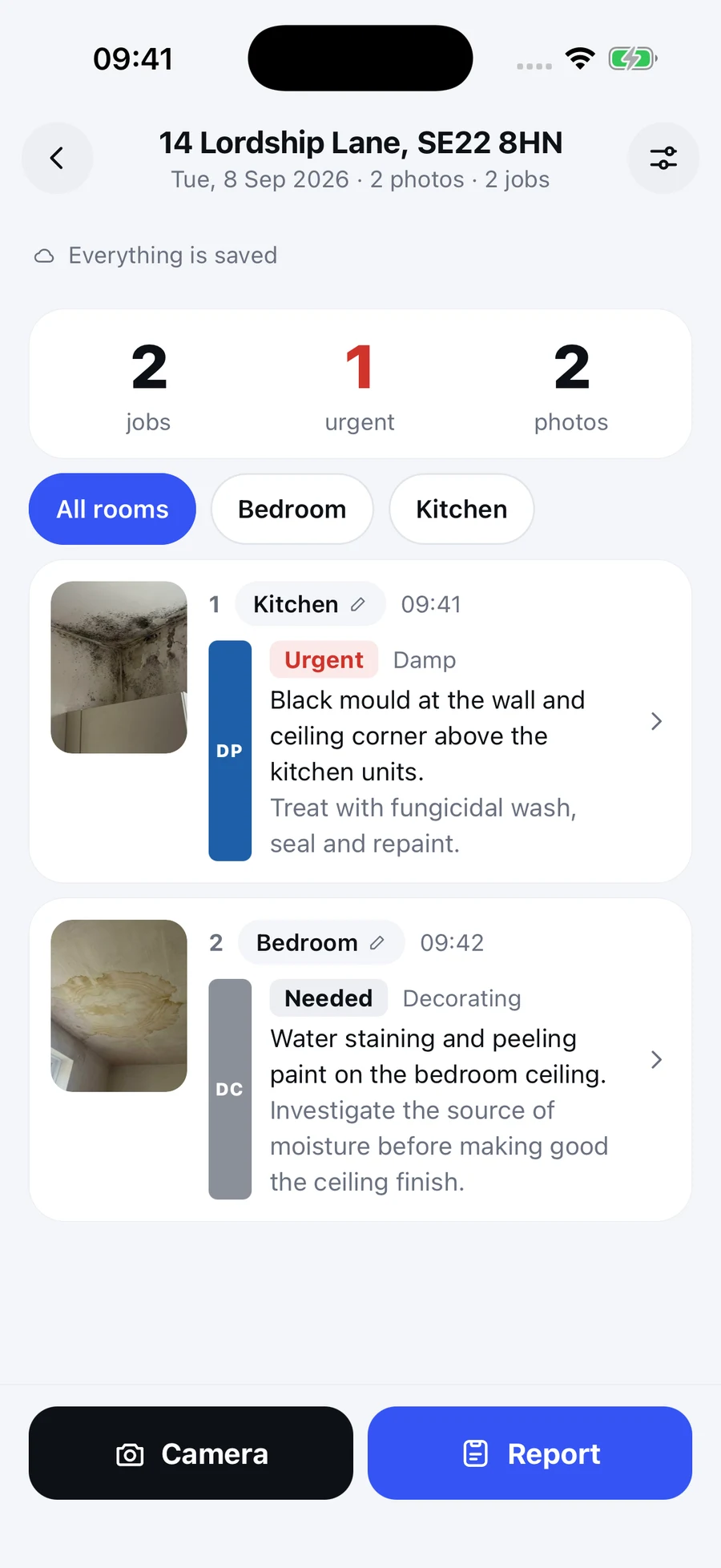
The SayScope iPhone app with a sample visit, its photos, draft work descriptions and priorities.

Actual iPhone app. Demonstration visit.

Where it pays for itself

Four things people do with the report, and the moment each one changes.

The quote that gets accepted

Before. You measure up on Tuesday and type it up on Friday, from photos you can no longer place. By then two other quotes have landed.

With SayScope. Walk the job, say each item in front of it, and send the scope of works from the van with a photograph on every line. The client sees exactly what you saw, the same afternoon, before anyone else has written a word.

You were the one who looked like they had already started.

The client who sends the next job

Before. The work was good. The client remembers an invoice and a WhatsApp thread of photos they never opened.

With SayScope. A photographed report after every visit shows the client what they paid for, room by room, in your name. It is the document they forward to the landlord and the reason the next order comes to you.

You are the contractor whose paperwork does the selling.

The snag list that actually gets fixed

Before. Ninety rows in a spreadsheet, no photographs, and a site manager who files it under later.

With SayScope. A list grouped room by room, each defect photographed and circled, in the order someone would walk the house. It can be acted on without ringing you, which is why it is.

You handed over something they could not argue with.

The proof that ends the argument

Before. Six months on, the row is about what the property looked like on a given day. Both sides have photographs and neither can say where they were taken.

With SayScope. A dated, located report with your spoken words against every photograph, signed off in the name of the person who was there. That is the document the argument gets decided on.

You stopped being the one who has to remember.

Why one app covers all of them

A snagging list, a schedule of dilapidations, a check-in inventory and a pre-works survey are the same task wearing four different words. Someone stands in a room, sees something wrong, and needs it written down with a photograph and a location so that a second person, who was not there, can act on it.

The differences are in the document at the end, not the walk. So SayScope captures the walk once and the AI shapes the output afterwards: grouped by room when someone has to work through the property, grouped by trade when someone has to price it or issue it. That is why the same app is used by a first time buyer with a snagging list and by a surveyor with a lease to settle.

The ten situations it is used in

01

New build snagging

A buyer picking up the keys to a new build

You have a week of goodwill and a house full of small faults. Spotting them is easy. Producing something the site manager works through rather than files is the hard part.

You walk out with: A snagging list grouped room by room, every defect photographed and circled, in the order someone would walk the house.

Read more on new build snagging
02

Snagging surveys, paid

A professional snagging inspector

The inspection takes two hours. The write-up takes another two, in the evening, from a camera roll of photos you can no longer place.

You walk out with: The same report, finished before you leave the drive, carrying your name as the person who inspected it.

Read more on snagging surveys, paid
03

Scope of works and quoting

A builder or contractor pricing a job

You measure up on Tuesday and quote on Friday, from notes that made sense at the time. The jobs you forgot to write down come out of your margin.

You walk out with: A scope of works grouped by trade, which is the document you price from and the one the client signs off.

Read more on scope of works and quoting
04

Before and after, for the client

A maintenance contractor or handyman on a job

You did the work, but the client was not there to see the state it was in first. Without the before, the after looks expensive.

You walk out with: What was found and what was done, photographed at each stage, in a report written for the client rather than for the office.

05

Dilapidations and schedules of condition

A surveyor or tenant at the end of a commercial lease

A schedule of dilapidations lives or dies on evidence. Each breach needs a location, a description and a photograph tying it to a clause.

You walk out with: A photographed record of every item of disrepair, grouped by room and by trade, with your spoken description attached to each one.

Read more on dilapidations and schedules of condition
06

Inventories, check-in and check-out

A landlord or letting agent

Deposit disputes are won by whoever has the dated photograph. Most check-ins are a phone camera roll and a memory.

You walk out with: A condition record per room with photographs, timestamped, that reads the same at check-out as it did at check-in.

07

Void inspections and stock condition

A housing officer or property manager

You inspect the empty property, then retype it into the system. Twice the work, and the detail thins out every time it is copied.

You walk out with: One record per property, grouped by trade, so the works can be issued to the people who will actually do them.

08

Handover and the defects liability period

A main contractor at practical completion

Defects get reported by text and phone call across twelve months, and nobody can say at the end what was raised or what was closed.

You walk out with: A dated, photographed defect record per visit, so the position at the end of the period is written rather than remembered.

Read more on handover and the defects liability period
09

Damp, mould and disrepair reports

A damp and mould surveyor

The photograph on its own proves nothing. What matters is what you said standing in front of it: where it is, what caused it, what has to happen.

You walk out with: Each affected area photographed and marked, with your own words as the finding, in a document a landlord or a court can read.

10

Evidence that holds up later

Anyone evidencing a claim or a dispute

Six months on, the argument is about what the property looked like on a specific day, and both sides have photographs with no context.

You walk out with: A dated report tying each photograph to a stated location and a spoken description, signed off in the name of the person who took it.
What is the same in every one of them

Whatever the document is called, four things decide whether it is any use to the person who receives it.

A photograph tied to a place

A picture with no location is an argument waiting to happen. Every photograph in SayScope belongs to a named room in a named property on a named date.

A description in your own words

You hold a button and say what is wrong. The AI turns those words into the written line, carrying the trade and the urgency. Nothing is inferred that you did not say.

An order somebody can work in

By room to walk it, by trade to price it. The same findings, sorted twice, because those are two different jobs.

A name on the bottom

The report is signed off by the person who did the inspection. A draft written by software and never checked by a human is not evidence of anything.

Whether this is for you

You will probably get on with it if

  • You would rather talk than type, and you talk about buildings all day.
  • You already take the photographs. You just never turn them into anything.
  • You want the job written up before you get back in the van, not after dinner.
  • You think a line nobody can price is not a line.
  • You have lost an argument once for want of a dated photograph, and you did not enjoy it.

It is probably not for you if

  • You want to configure templates, checklists and workflows before your first photo. There is nothing to configure and that is deliberate.
  • You need assignees, due dates and a close-out workflow. This records what is wrong. It does not manage the fixing.
  • You want the app to estimate quantities or prices. Record those yourself and check the AI draft before sharing.
  • Your walk is already written up perfectly by somebody else, for free.

Start free. Share one report a week free, up to 10 jobs. AI usage limits apply. What it costs after that.

Where to start

If you are snagging a new build, start at new build snagging. If you are settling a commercial lease, start at dilapidations. If you are pricing work, start at scope of works. All of them are the same app, the same walk and the same free weekly report.

Questions about what it covers

Can SayScope be used for anything other than snagging?

Yes. Snagging is the best known use, but the app records any property inspection: dilapidations and schedules of condition, landlord inventories and check-in reports, void and stock condition inspections, damp and mould surveys, contractor handover and defects liability visits, before and after records of a job, and pre-works surveys before quoting. The walk is the same in all of them and so is the app.

Does the AI write things I did not say?

No. The AI drafts each line from your spoken words, with your photograph attached to it, and it does not add a quantity, a cost or a cause you did not state. You check every line before it goes out, and the report carries the name of the person who did the inspection.

Is there a template to choose before I start?

No. There is no project to set up and no template to pick. You type an address and start photographing. Rooms are named by saying them out loud as you walk, and the report is shaped afterwards, so the same visit can be read grouped by room or grouped by trade.

Can I use it for a commercial property, not just a house?

Yes. Nothing in the app is specific to residential property. A dilapidations walk of an office or a unit is recorded the same way as a walk of a flat: an address, rooms or areas named out loud, and a photograph with a spoken description for each item.

Does it work with no phone signal?

Yes. Everything saves on the device as you capture it and uploads later when there is a connection. Basements, plant rooms and empty new builds are exactly where signal fails, so the app never depends on it.

Do I need an account to use it?

You can try your first visit without an account. In the iPhone app, free sign-in with Apple or Google is required from the second visit and links your work to your account. The browser version saves work in the browser you use; keep that browser’s data to retain access.

Whatever you call the document

Walk the property, photograph the problem, say what is wrong. Unlimited visits free, and one report a week goes out free.

Try free in your browser

One free report a week · Up to 10 jobs · No card